Instagram Photo Downloader
Download Instagram photos online in high quality using a tool
How to Download Photos from Instagram Easily
Are you interested in saving images from Instagram? Our comprehensive, step-by-step guide will show you how to quickly and safely download images from publicly available profile pages with the help of online platforms, as well as through popular applications.
The guide will provide beginner-friendly tips on downloading Instagram photos without sacrificing image quality, along with secure ways to store downloaded photos on any device. The guide will assist content creators, marketers, and everyday users who desire a streamlined process for saving images to their devices.
Step 1 : Copy the Post Link
Start by locating the user's Instagram feed and the desired Instagram post. The next step is to click the options icon located below the post and select Copy Link from the list of available options for the current post.
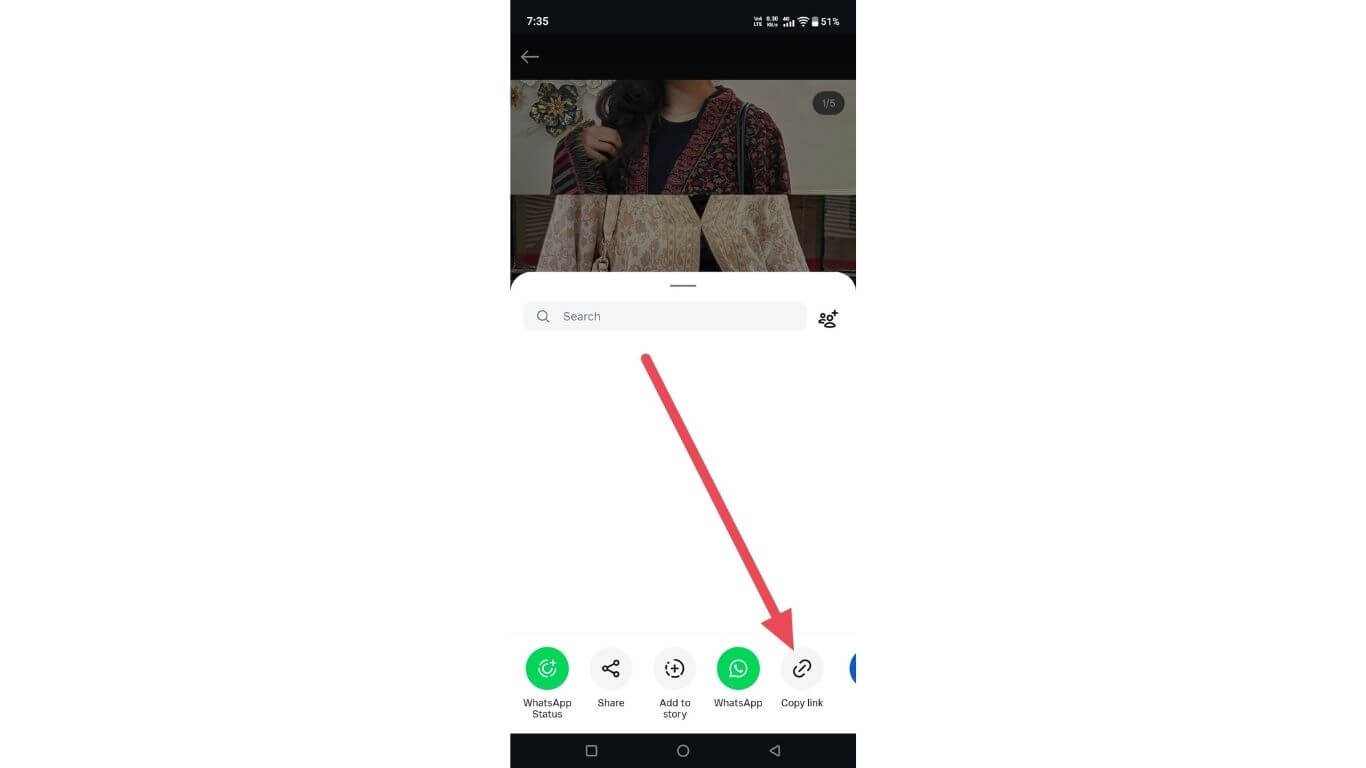
This will securely gather the URL (or Uniform Resource Locator) giving a direct file location for the referred image. In doing so, it enables you to maintain the quality and dimensions of the original photograph, as well as all of the visual elements associated with the image.
Step 2 : Paste the Post Link
Copy the hyperlink, then go to your trusted web-based image upload application and paste the URL into the input area.
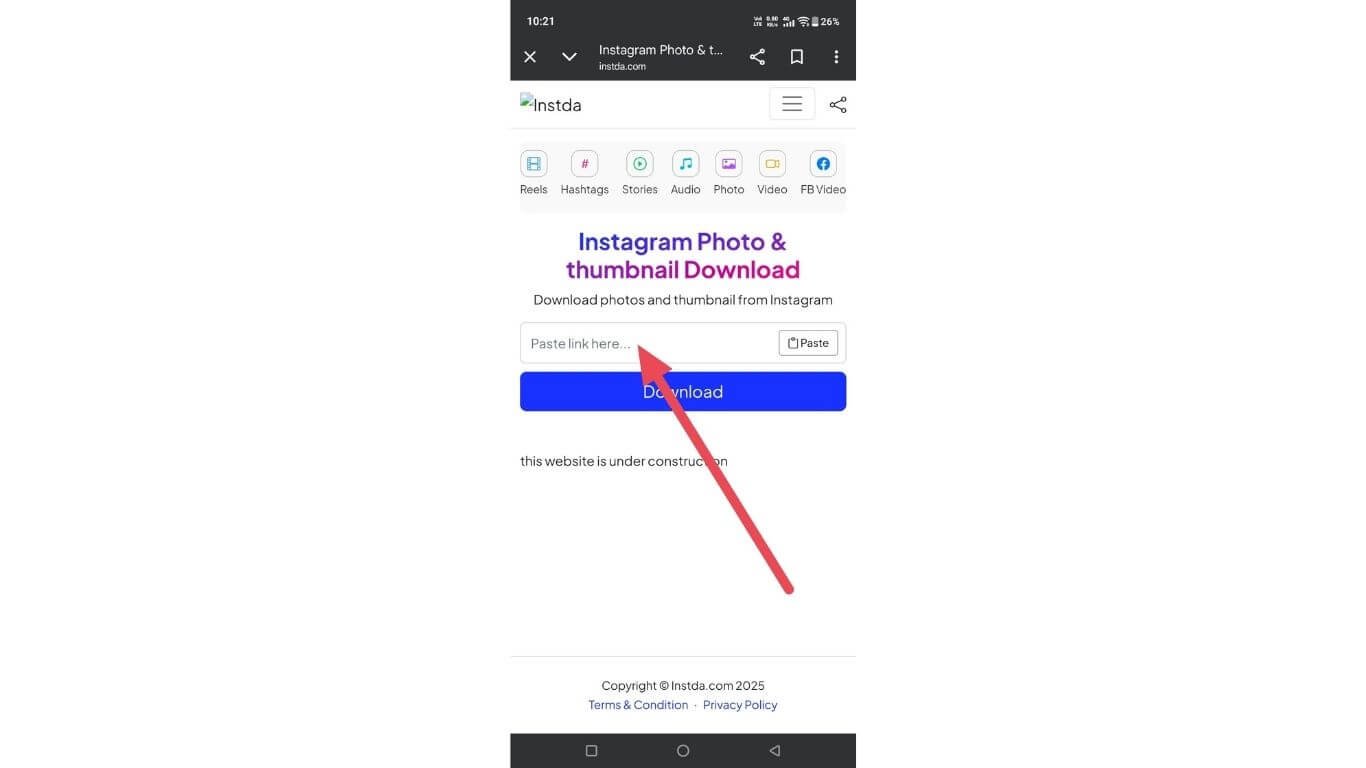
Double-check that you have copied and pasted the correct URL by reviewing it for any accidental or unnecessary characters. This ensures that the site has access to the post data, can extract the image content from the post, and will format it properly for seamless uploading or viewing from any device.
Step 3 : Download the Post
Once the post has been analyzed, you can save your image file by selecting from the available resolutions.
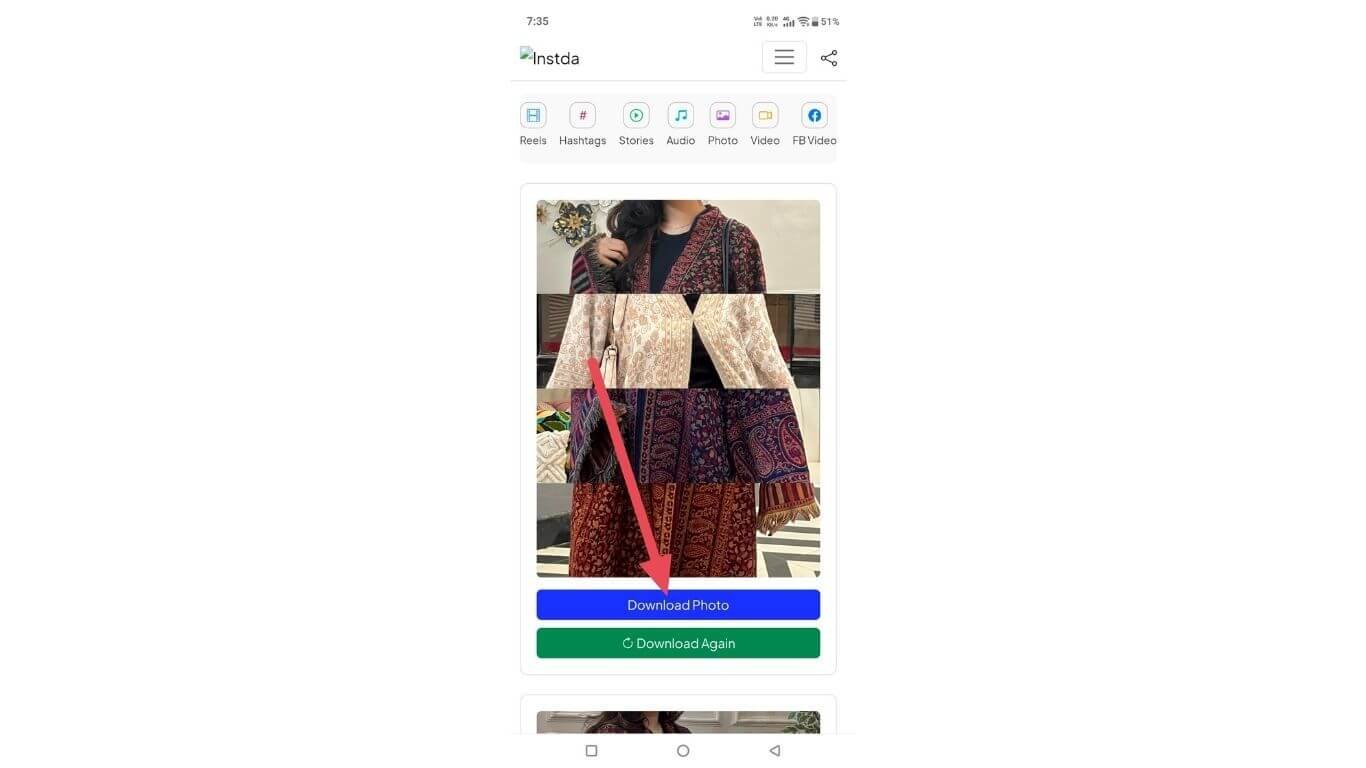
The saved photo will be placed onto your device where you can view it offline, reuse it for reference later, and share it with others without worrying about watermarks, account access, or interruptions.
Table of Contents
Instagram Photo Download in HD Quality Online
There is no need to install any additional software to download high-resolution Instagram images since there are reliable web-based solutions available to do just that. This page provides you with tools to acquire quality photos from Instagram from: Public Posts, Reels & Profiles.
Quick Processing, Privacy-Focused Tools, and Easy Steps: All of these create a quick and easy way to save HD images – securely. On mobile or desktop – anyone can save high-definition images anywhere they have access.
Best Tools to Save Instagram Images on Mobile & PC
Top-rated Instagram image saver solutions offer compatibility for both smartphone and PC users, allowing them to seamlessly collect images from public Instagram accounts.
The list of platforms also includes an overview of some of the options available for users who want to save their images. Factors include photo saving speed, retention of image quality, and safe use for both PC and mobile users with a focus on user experience best practices.
Generate Hashtags for Free
Marketers are often keen on keeping their well-performing category combinations for later use. A tool providing a Hashtags downloader offers marketers a quick way to save successful combos of tags for future campaign use. There is no need to go back to the drawing board, and it creates brand consistency.
Tag archive lists speed up time to market and reduce errors in the workflow process, especially for agencies that have multiple clients in different industries and are creating large amounts of content in advance with a focus on growing their business efficiently and building a scalable workflow.
Download Audio from Posts
When creating videos, many creators will look for music that fits with the content they are making, whether they are matching a trend, mood or whatever else may be trending at the time. One way to do this is by using a Reels audio downloader to quickly separate audio from visual media.
Being able to listen to the audio without being connected to the internet allows creators to continue working without having to worry about being connected to their social media page.
This is a very useful tool when doing things like editing videos, synchronizing lip movements and figuring out timing for things like viral sounds, especially when considering how much data creators use while being on their devices all day long.
Fast Reels Saver
The ability to watch and analyse trending short video content offline, offers the opportunity for a greater appreciation of both the creative style and the behaviours of its audience.
Save reel videos services allow users to view these videos multiple times without any distractions from advertising or social feeds, which can be extremely helpful for marketers, students, and editors looking to understand how to improve their content's quality and engagement through careful analysis of timing, captions and visual storytelling.
Fast Story Downloader
The identification of trends and engagement cues by educational and marketing groups is performed by analyzing stories (temporary posts) after the fact. Offline accessibility enhances user's ability to focus on, and accurately review, such analyses.
Save story functionality offers users the ability to plan, evaluate their creative content and create benchmarks for their content while reducing their reliance on application algorithms, alerts, or unreliable internet connections when conducting research or preparing for presentations in an increasingly competitive social media landscape today.
Free Video Saver
Tools that are designed to be used on a web browser enable social media clip retrieval without having to go through a registration or install process. Through the Paste URL, the user will get a clean file in a matter of seconds. This will be advantageous for not only content creators but also students researching social media and/or one of the social trends.
When accessing an Insta video through the web browser, we can ensure the same compatibility, quality, and performance of the video across all devices - including phones, tablets, and computers - to facilitate an organized offline review of the video while preparing a daily competitive content analysis project.
Additional Download Tools You May Need
There are numerous specialized services for separating soundtracks from videos. Extracting the Facebook audio function saves voice clips, speeches and/or background sounds; hence, it's an invaluable tool for those who use podcasts, making presentations, or create educational material.
Having access to clean audio enables productive work and allows for concentrated listening without being distracted by other visual materials or interrupted by social media feeds.
Download Instagram Profile, Post, and Carousel Photos
Seamless gathers photo's from here to there by allowing users to quickly download any photo to multiple locations via one easy interface.
This allows users to easily access every type of user uploaded photo. The website offers step by step instructions, speed of use and keeps the original level of quality high enough for use as inspiration and research in the planning process across multiple operating systems.
Save Instagram Photos Without Watermark
By using the recommended Instagram Sagging method, users can save Instagram images in original format without any unwanted logos or overlays.The goal of this website is to help users maintain high-quality digital clarity by removing distractions from their photos.
With easy-to-follow instructions, rapid processing speed, and preservation of the quality of your images throughout this process, users have the opportunity to save and keep all photos they like for many purposes including personal reference, to have as a source of ideas for graphic design projects, and to have available for viewing offline, whenever they desire.
Is It Safe and Legal to Use an Instagram Photo Downloader?
The importance of comprehending copyright and privacy policies prior to utilizing an image-saving service on Instagram cannot be overstated; therefore, this information clarifies the Security Policy, Legal Use and User Responsibility regarding access to public images on Instagram.
In addition, it discusses how these types of compliant services safeguard your data; support your right to download images in compliance with Instagram's Terms of Use; responsibly and ethically download photos, so that you can make choices based on the platform's restrictions and regional laws on digital content.
FAQ'S (Frequently Asked Questions)
1. Can individual images be extracted from carousel posts?
Yes,Each photo from a multi-image post can be viewed/recieved as a standalone image. Therefore, users have the choice of selecting and saving only the individual images instead of saving the entire carousel photo collection as a single file.
2. Do Instagram images lose sharpness after being saved?
When processed correctly, the images will retain their original clarity (the uploaded image quality) and resolution. Any detectable (visible) quality loss is primarily due to the attributes of the uploaded image rather than the method used for saving them
3. Are profile pictures available in full resolution?
You can often obtain a profile image at higher resolution via a dedicated application to pull the ingrained profile picture from Instagram as opposed to the compressed preview image that appears on the app.
4. Can Instagram images be stored without affecting my account?
Yes, Saving public images will not cause any interaction with your account and therefore, Instagram will not record any actions taken on your profile whether it be likes, posts, etc.
5. What image formats are commonly provided after saving?
Public images are almost always provided in standard formats such as JPG and PNG, which allow for use across any type of computer or portable editing device with no issues with inter-compatibility.