Instagram Video Downloader
Save Instagram videos online in high quality with a tool
How to Download Videos from Instagram Online
Using a web-based tool that supports safe video downloads can help download Instagram videos online quickly and easily. Simply paste the link into the web-based tool, select your desired video quality, and press download to save the content to your device right away (this works for both mobile and desktop devices).
The process is easy and allows you to download all of your favourite Instagram videos for offline viewing (including Reels), without compromising your privacy (no login required!) and has very fast speeds for video download.
Step 1 : Copy Video Link
To save an Instagram Video, find the video you want to save with the Mobile app or desktop browser.
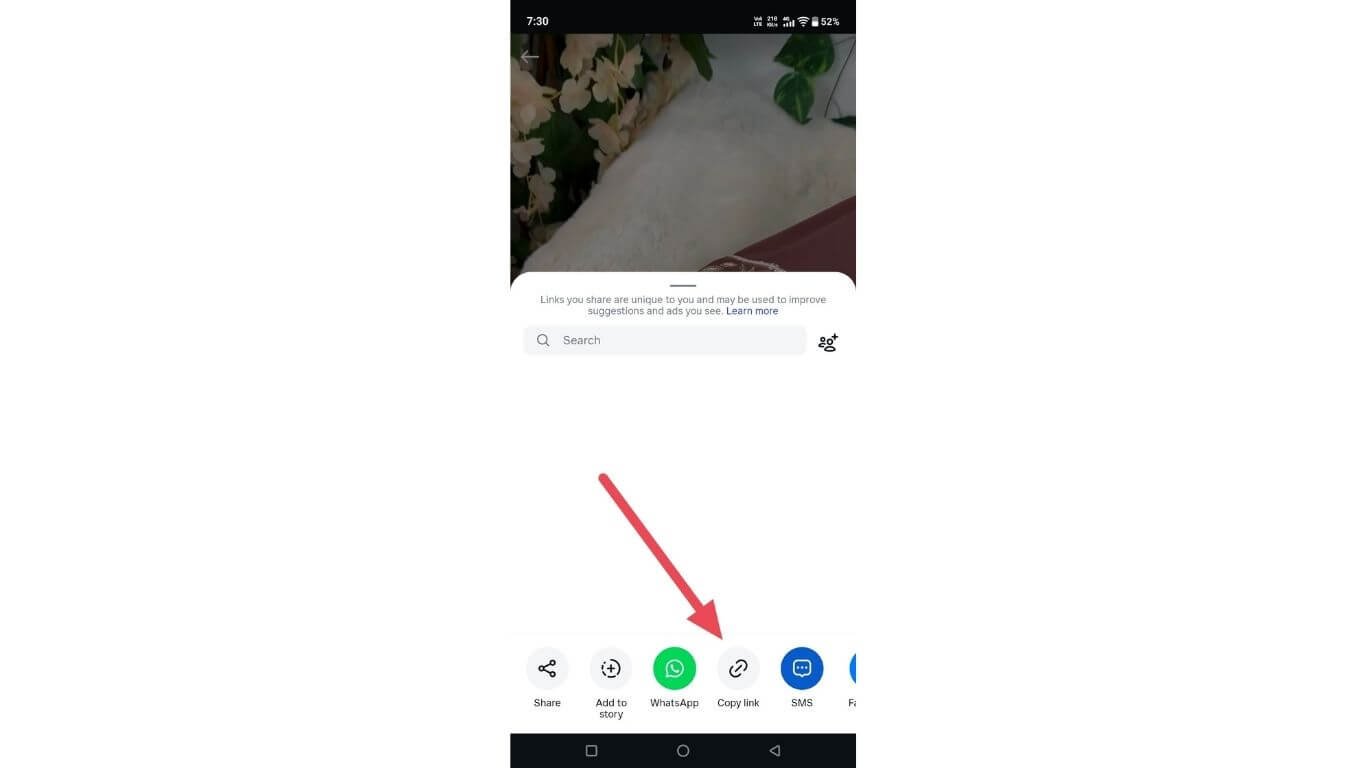
Open its options menu and choose to copy its link (this captures the video source URL, which must be used to retrieve the media). Using the URL ensures that you have saved it at the original resolution, audio quality, and playback format.
Step 2 : Paste Video Link
To continue, locate a reputable Instagram video downloading website and enter your copied link into its submission field. Ensure that you provide the entire URL (the complete link).
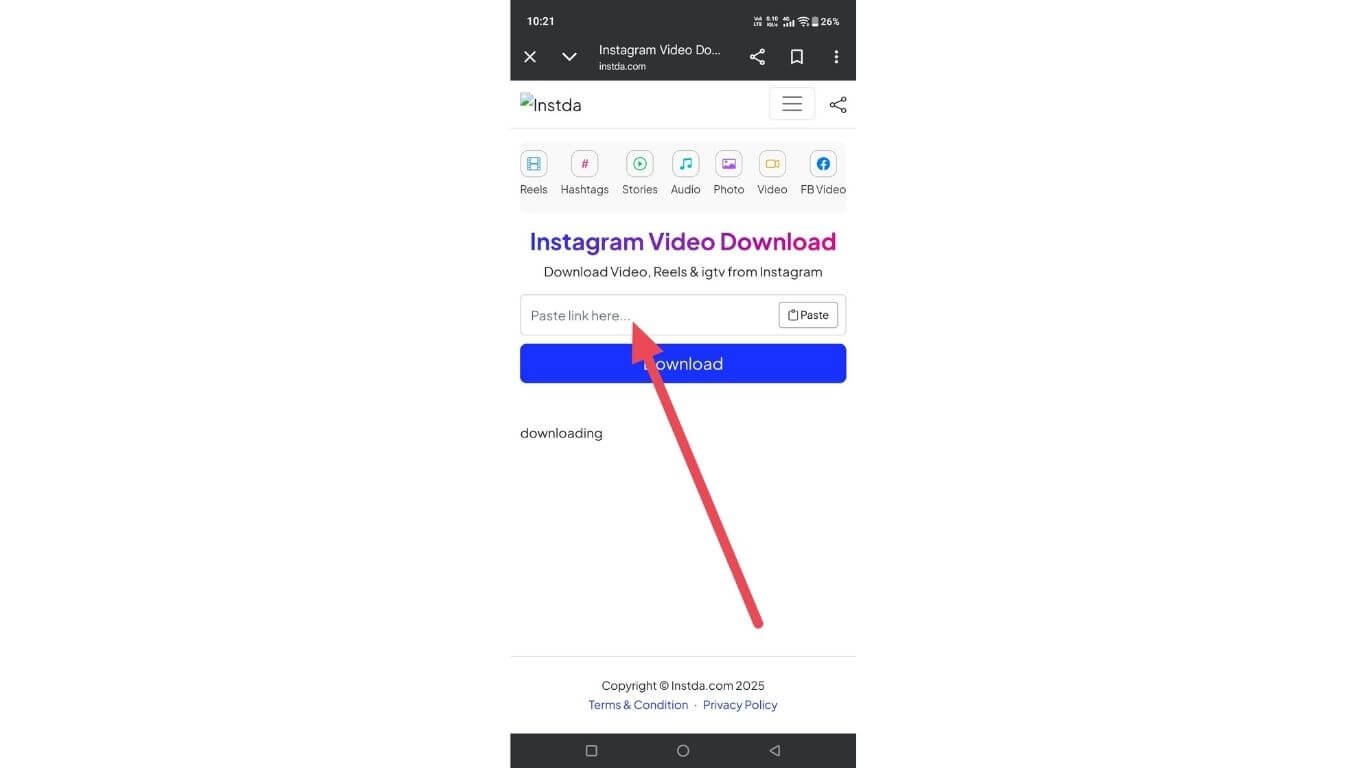
Once your video is identified, the service will be able to confirm whether or not the video can be viewed and make necessary arrangements to securely process your video file so that it may be downloaded on multiple platforms (Windows, Mac, Linux, etc.) as well as other types of devices.
Step 3 : Download the Video
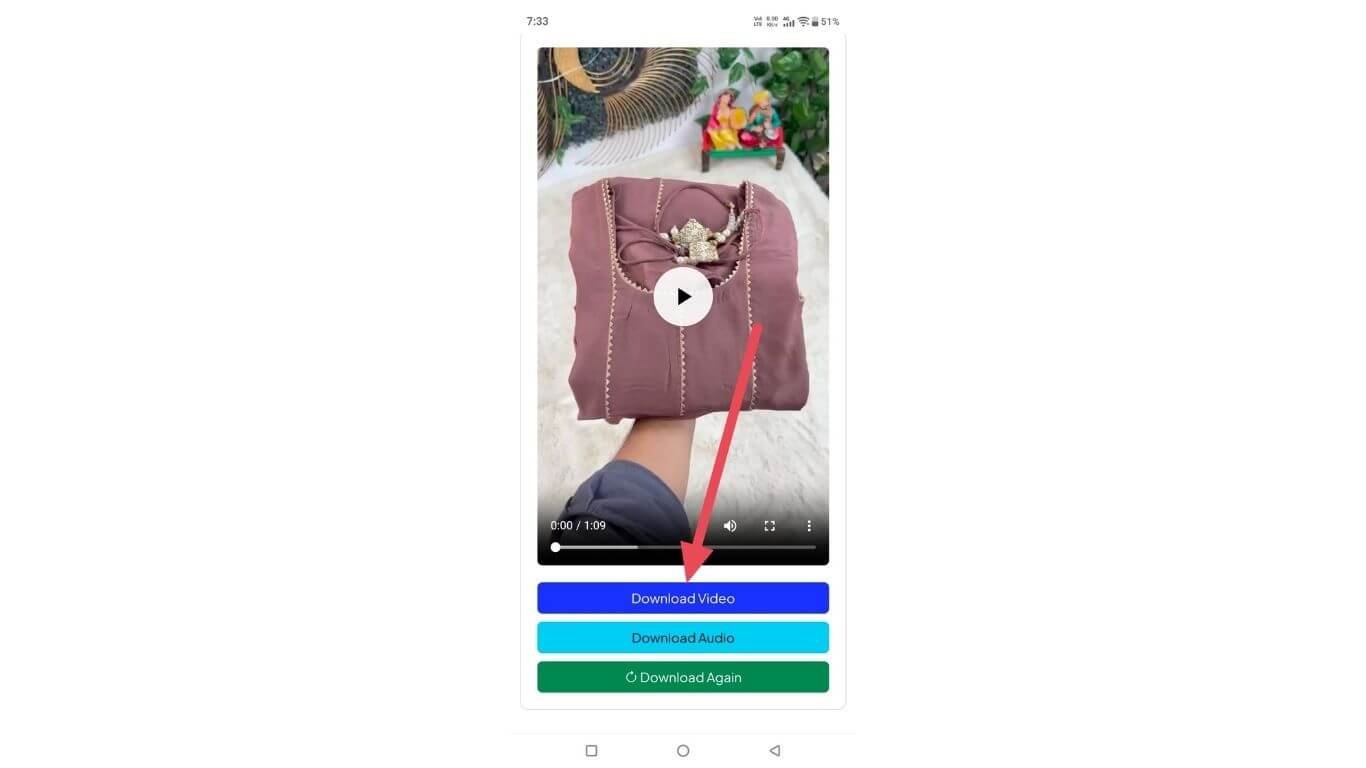
Once you've completed processing, you'll be given the option to save your processed video file using your chosen quality setting, and have them downloaded right to your device! You will have offline access to your saved video, as well as being able to reuse your saved video for your own personal use, and easily share it with others, with no need to log in, no watermarks, and no redirectional hassle.
Table of Contents
Instagram Video Download Fast & Free Method
Easily download Instagram video clips using a free web-based service tailored for speed. Simply copy the post URL and instantly process it to capture the video in high quality without needing to install any software.
This service enables you to download Reels, Stories, and Feed posts on all devices while protecting user information. It provides a simple, seamless way for beginners to access their content quickly. This free tool is perfect for content creators, marketers, or anyone looking for immediate access to their video content from Instagram.
Best Tools for Instagram Reel and Video Downloads
Many creators and casual users value solid methods for saving Instagram reels and videos.
Many of the best solutions provide instant processing of media files with an organized, clear interface, support video formats up to HD without requiring an account to become a participant, and allow users to store their inspiration, re-evaluate their videos offline, or have a productive way to manage their social media accounts using very sophisticated new technology (smart workflows).
HD Reels Download
Short-form videos are emerging as an increasing powerful medium to learn, engage and keep up with current events. Many creators use services that operate similar to a Reel saver application so that users can download inspiring content to view offline whenever they want.
With offline access to these videos, creators can revisit their creative ideas, analyze the transitions in their videos, and enjoy the viewer's favourite videos whenever they choose to without concern for current network availability or posts that may have disappeared.
Save Photo from Internet
Often, creators and research people require a reliable means of obtaining visual content while conducting their research and analysis. By utilizing tools specially designed for procuring instant Instagram photos, users can accurately analyze the artistry (composition), colors, and patterns indoors.
As such, it aids the process of creative growth, building/create a content strategy, and promote education without our current era's drawbacks such as algorithm disruptions, advertising (ads), digital glitches (poor internet connection) on during key periods of investigation and/or inspiration.
Hashtags Generator
Users who use Intelligent Systems to help them create Tag Suggestions can create content planning quickly and efficiently. Intelligent Systems can generate Hashtags based on Keyword and Niche Data and allow Users to Save Time and Effort.
Generating Hashtags for each post provides consistency by allowing Posts to appear in relevant searches and being included in suggested sections. Creation of Hashtags increases a Creator's posting confidence significantly as it allows for the creation of multiple campaigns simultaneously across several Competitive Visual Social Networks today with measurable Organic Reach gains.
Safe Story Downloader
Privacy-oriented products allow for the creation of a public medium or content without using a login or tracking system. A well-designed tool will work seamlessly on all devices and browsers.
By selecting a Story downloader that safeguards your privacy, you can review and archive visual content whenever you wish and keep track of your posting methods while utilising the resources of a global audience without breaking the terms and conditions of the platform or compromising your safety while conducting repeated offline viewing of content from around the world.
Audio Saver
As short-form content becomes increasingly popular, there is a rise in the use of tools that are sound-based. One such tool is the Audio downloader, which can be accessed from a web browser. This audio downloader allows users to easily obtain clean sound files from any public link, eliminating need of complex software, so it is perfect for beginners.
The audio downloader also makes it easier for content creators to analyze trends in music, voiceovers and sound effects offline, which supports creators in developing content ideas (remix ideas), planning ahead and managing their workflow efficiently while competing in a fast-paced digital environment.
Other Popular Download Options
Popular across digital platforms, short-form content is on the rise. Tools available to view offline Reel Video formats give users the ability to analyze trends, transitions and stories. Creators can use these tools to view their videos multiple times without interference from the algorithm.
This enhances creator's ability to plan and edit their content, as well as develop a better understanding of their audience's interests in a competitive digital marketplace.
Save Instagram Videos in HD Quality on Any Device
All devices (Smartphone, Tablet, Desktop) have easy access to download a High-definition video from Instagram. Many of the advanced online platforms available will keep your video picture quality and original audio intact without leaving a watermark on them.
With all of these platforms, you can store your Instagram reels and posts and download them in the highest resolution possible, view them at any time, and play your videos back smoothly without having to be connected to the internet.
The download process is very quick and safe; it works on any operating system; and you don't need to have any advanced technical knowledge to do it.
Instagram Video Downloader for Reels, Stories, and Posts
An advanced Instagram media downloader allows users to quickly and reliably store short videos (reels), exciting Instagram stories and everyday Instagram videos with ease.
This media downloader is designed for maximum speed, reliable performance, and allows the user to store videos in all possible formats, as well as retain their quality when transferred to other devices.
As such, it is a valuable resource for individuals who wish to conduct content research, view content while offline or simply find social inspiration without requiring complex processes or access to an account.
Is It Safe and Legal to Download Instagram Videos?
The main concerns regarding Instagram video downloaders include copyright and privacy issues.Users tend to consider trusted third-party services as a way to use public content for private purposes; such as research, offline viewing, etc.
Users are advised never to download videos from private accounts, to respect the creators' rights, and to refrain from re-distributing videos that are intended for commercial use without permission of the original creator.
By using reputable platforms for downloading, users will be able to minimize security risks, prevent damage to their devices or personalisation, and maintain compliance with the site’s policies.
FAQ'S (Frequently Asked Questions)
1. Can Instagram videos be saved without creating an account?
Yes,Public videos from Instagram have the capability of being saved without requiring you to create an account or use an existing Instagram account. There are online tools that can download the video for you, taking only a link to the public post from Instagram to do so.
2. Do saved Instagram videos work on all media players?
The majority of files stored in this manner will be playable with common media players found on most smartphones, computers, and smart TVs, although some of them may run smoothly without requiring additional codecs or special software.
3. Is there any limit on how many Instagram videos can be saved?
Unlimited free online services are available in an infinite number of ways but sometimes will be temporarily limited when there is a temporary spike in usage. If there is a problem, wait a minute or two, or try refreshing the page.
4. Can Instagram videos be saved for educational or reference purposes?
Yes, a large number of consumers use these services to save some content they wish to work with in the near future. If the information is going to be reused in a personal manner only, it doesn't require permission or a license to be used.
5. What should I do if an Instagram video link shows an error?
If you receive an error message, ensure you have copied the link correctly, and that the post is publicly available. In many cases, clearing the cache or giving it a minute or two will resolve the issue.